A year ago I was happily using Tweetie on the iPhone.
Then the guy who created it, announced that he was creating a new version. He’d changed the colour scheme and I didn’t like the new version, so I stuck with the old version.
Another while longer, and he announces he’s selling up to Twitter – and Tweetie would become the official Twitter application for the iPhone.
Great! Nothing could go wrong there, could it?
And so Twitter for iPhone was born. An official app at last, with the proper backing of the company that created the service. It should almost certainly be better, and have new features included at a much faster rate than before.
It transferred, changed name from Tweetie to “Twitter for iPhone” and while it is undoubtedly a cleaner interface, it really isn’t very good.
I was right about them implementing new features quickly – far too quickly.
When Twitter decided to go from old style RT: or via retweets, to new style retweets, the now-official Twitter app stopped supporting the old method instantly.
Sometimes it’s nice to add a comment/joke to something you’re retweeting. You can “quote tweet” but it’s not the same.
But I was alright – I was happy using the old version of Tweetie from before the sale. Happy that is, right up until it started crashing a lot.
Then when Twitter made some changes to the way you log into the service, Tweetie stopped working altogether. It won’t log in at all.
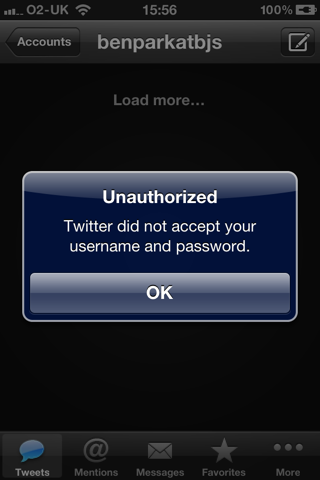
Tweetie no longer works
I was forced to abandon the best Twitter app ever made, and start looking around for an alternative app.
Twitterific
I used this when I first joined Twitter. It made a pleasing twittery-bird noise when you started the app, but I eventually stopped using it, because locations and photo updates were a bit fiddly/non-existent.
I returned to it now, only to find out they have completely screwed the layout.
Where’s all the buttons?
I’m all for a clean interface, but not if that means having to click “benparkatbjs“, every time before I can load anything else. Crap.
Twitterific screen showing main feed
And there’s ample space at the bottom of the main screen for some buttons, too. Seems silly not to have included them.
Tweetdeck
The iPhone version of the full-screen mission-control style interface you get on Mac/PC/Linux.
When it launched, it was heralded as being really quite good.
What makes Tweetdeck so good is just how customisable it is. You can add columns, a quick swipe left or right goes from mentions to the classic Twitter timeline and back again. You can specify keyword searches and save it as a column, for when you’re armchair surfing while watching the apprentice, or another program with a live Twitter debate happening.
Tweetdeck is very customisable
It features Retweet new style and retweet “classic” style, and has a dark theme.
However, it keeps crashing on me.
There’s really only so many times I can type a message and have the app crash as I try to send it, before I give up and use something else.
If it could be stabilised to stop it crashing all the time, I might well use Tweetdeck as my main client.
Hootsuite
While this ticks a lot of boxes for me, it fails on some things that are so spectacularly silly.
Why is the inbox and outbox for DirectMessages, separate?
When replying to a message, sometimes it can be handy to see the conversation from earlier – to make sure I’m not repeating myself, and in the case of some people who don’t reply quickly – I may well have forgotten what I asked by the time they reply.
Hootsuite's main feed
I like the dots at the base of the screen, which similarly to Tweetdeck lets you see which screen you’re on.
It suffers from the same problem as Twitbird in the way that if you want to go from the main feed to mentions, you either have to have configured them to be next to each other, swipe multiple times left or right, or exit to the menu to then select the one you want from there.
The “contacts” tab is an unncessary button. If I want to reference them, surely I’d start a new message. From there, there should either be a users list option in there, or to work as Echofon does, where you start typing a message and it guesses who you are referencing.
Twitbird
What the hell were they thinking with this interface?
Twitbird's bizarre main feed screen
The buttons at the bottom left are possibly the least helpful things you could need.
From left to right, far left button returns you to the top of the screen. Pointless – just tap the top of the screen and it returns there anyway.
Next along is a tick box. Click it and you get only one option – to mark all as read. Again – surely it could do that automatically when you reach the top of the screen?
The middle button of the flower. What does that do? Probably something urgent that I need regularly.
I urgently need to change the wallpaper
Set the wallpaper? You’ve got to be kidding me? On the main screen?
How often do I change the background wallpaper, that it needs a button on the main screen?
The funnel-icon is a filter, with options to display all tweets, latest unread or first unread. Just not sure that’s really necessary.
Where’s the option to view my mentions, or see my Direct Messages? How can I see my favorites?
Go left, gives you an option of mentions, direct messages, but it’s a clunky ‘mentions – back – direct messages – back’ sort of menu structure. It’s just a bit poor really.
Echofon
I won’t lie. What first attracted to me to Echofon is the fact that it looks a bit like the old version of Tweetie. It’s got a sort-of “dark” theme for reading in bed, and has the ability to disable screen rotation (for when you’re reading in bed, and lying on your side, you can tilt the phone sideways without it tilting the words the wrong way from you again).
Echofon's main feed screen
It has a very handy feature that auto guesses who you’re messaging, as you start typing the username (much like sending an sms on the iPhone). This comes in incredibly handy.
Echofon's autosuggest
Echofon isn’t perfect either though.
While it supports the iPhone4’s multitasking mode and runs in the background, the Direct Message count never updates properly.
Consequently, I have always received the “direct message from <user>” email from Twitter, a long long long time before Echofon notices (which is rare).
To be even more frustrating, when you reply to a DM sent to you in Echofon, it doesn’t at that point check if you’ve received any messages – so it can look as if you’re constantly messaging someone who isn’t replying to you (which is only very occasionally the case).
Until it crashes.
When it crashes, and you open it again, it will suddenly check the DMs and update them all the right way around.
Another annoyance with this is how clunky it is to get to your favorites.
I favorite things A LOT during the day – especially pictures and video clips – to look at later when I’m not busy working. It is rather annoying to have to click menu, favorites to see them. Then you can’t just swipe one to delete it, you have to click it, then press a tiny yellow star. Not ideal at all.
Preferably, I’d like a button at the top or bottom to link directly to favorites. I very rarely use the “lists” button.
Recently Twitpic have been having some technical difficulties. I either can’t access the site to view pics, or I can’t post anything.
In the options, the only other photo services you can use with Echofon are Tweetphoto or Flickr. It would be nice if it worked with Google Picasa, or had some kind of FTP option to upload photos to my own webspace, as I don’t really like uploading photos to third party sites at all – which you’ll know if you’ve read my post about privacy (to be fair, none of the other apps support either of these options, either).
What none of them can manage.
This new style of retweets that Twitter has adopted makes it really awkward to see if someone has retweeted you.
Why can none of the software clients just show them in the “mentions” tab? If someone is retweeting you, even by the new style, they’re still mentioning you. They should just be combined into one column.
At the moment, I get completely lost looking for whether I’ve been retweeted or not, and it’s nice to know (and thank the person involved) if someone thought the twaddle I’ve just spoken was actually worth retweeting.
Several clients above have a “my tweets retweeted” screen. That’s great, but it doesn’t tell you WHO retweeted them.
They can for tweets others have retweeted. I can see that one of my friends retweeted something that Duncan Bannatyne said. Why can’t I see who retweeted my crappy joke?
For the moment, Echofon is my preferred client as the best all-rounder.
Hootsuite probably second.
It could all change though if Tweetdeck could just make their app stop crashing.
So this morning, I received an email from Facebook telling me:
“You haven’t been back to Facebook recently. You have received notifications while you were gone.”
My first reply to this was “meh”.
This evening, I got home, and had another look at the email. Apparently I have “9 photo tags”.
Is that right? Does that mean I’ve been tagged in 9 photos? That seems pretty unlikely really.
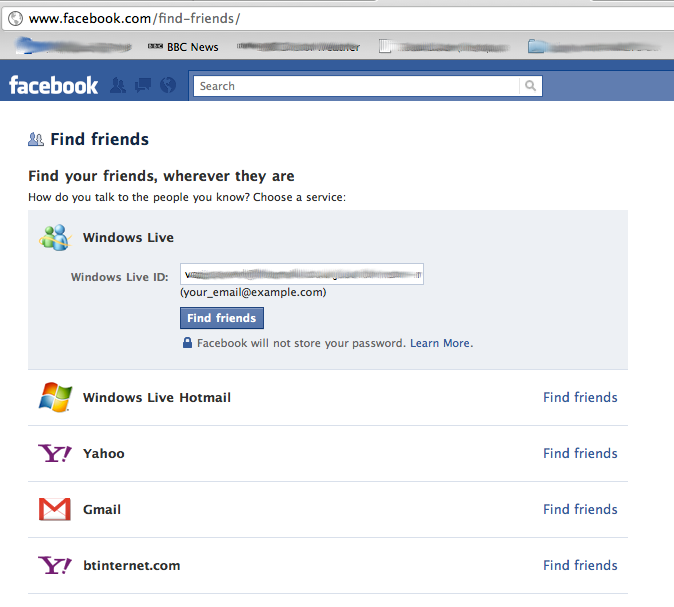
What’s more odd is that clicking the link to see these 9 photo tags, takes me to this page.
Right. What’s that about then? No photo tags, just Facebook trying to get me to spam a load of my friends, surely? Classy.
I’m giving serious thought to completely deleting my Facebook account lately.
I rarely log in, because it is really boring.
If I wanted to keep in contact with people I went to school with, I’d have remained doing just that. And as for whether a friend of a friend likes the same films as me, I’m not that interested. Farmville schmarmville – I’ve got better games to play.
During a recent conversation with someone who hates a lot of modern technology, we discussed Twitter and Facebook. I described Twitter as an information sharing tool, and Facebook as a complete waste of time.
For me, Twitter is a way of sharing information in real-time.
Yes, there are people who are “having breakfast”, but not many. There’s a lot more “have you heard this interesting news? <link>” or “I’m watching a really cool animation at <link>” or pointing me in the direction of an interesting news story that has literally just broke. It’s constantly updating. An endless stream of instant news from around the world. It’s news one minute, it’s old news an hour later. But you can still dip in and out, because the really interesting video clips and news stories will spark debate and stick around.
Through hashtags, you can share the experience of a really interesting TV show. I can sit and watch Dragons Den, and if I wonder whether everyone thinks this idea is as stupid as I do, I can find out, via a quick search of #dragonsden, all in nearly real time.
Facebook is allegedly for keeping in touch with people you already know, but I think it’s just a big noise machine.
Remember Sarah? That hot girl at school you never really spoke to? Look – why not make her your “friend”, and go and look at all her photos.
Remember Dave? He’s got a better job than you, a bigger house than you, and he’s just spent 3 weeks having a better holiday than you’re going to have this year. Here’s 50 photos to prove it!
Remember Kerry? Well Kerry’s had 2 kids already – here’s a 150-picture slideshow of incredibly-similar pictures of them.
It’s like signing up to the Michael Buble newsletter. I might get to see exclusive galleries, and know what his favourite film is, but who the fuck cares? It’s just boring tedious photos and other information about someone boring that I don’t know, care about or like.
Yes I could do the sharing of information via Facebook, but there’s so many more adverts and other distracting shit I don’t need, and honing in on one live topic seems a lot harder.
If you’re with a group of friends and someone tells a funny joke, that’s all you need to pass on. Nobody needs to see 50 photos of how you got to the room where the joke took place, with all the individuals tagged and named.
The twitter version of someone coming back from holiday might be “Finally back in the UK. Greece hot, sunny, beautiful. Can’t recommend it enough. So what have I missed here?”
The Facebook equivalent involves a boring slideshow of 100 pictures, and having the same conversation over and over because each of them can only see one side of your wall chatter.
Several people have told me that Facebook helps keep them in touch, or organise social whatnots, but it’s a load of bullshit. There is nobody in the world who has so many good actual friends, that they literally never have time to see them in person, or call them on the phone.
The people in real life you don’t email, text or phone, are the people you can’t really be bothered keeping up with.
But what if it’s too late for prevention?
What if you’ve been taking photos and sharing them online for ages, via services like Twitpic and Yfrog. What then, eh?
Presumably you can just select all your photos and delete them, no?
Well, no.
If you try and find a way to delete all your photos from Twitpic for example, you’ll likely come across this handy information.
That’s two options right there.
Neither of which actually deletes anything.
“Both of these methods are undo-able, which means that your account and photos will be restored if you login after deleting your account.”
Everything is just temporarily hidden from view.
So the only option, if you want to delete them is to do it from the main screen. ONE AT A TIME.
After every one, you get a handy popup message to ask if you’re absolutely sure, before the page very slowly refreshes, and you can attempt to delete another. Everything is geared to making sure you don’t just delete all of YOUR OWN photos.
Twitpic isn’t the only option though. Maybe Yfrog is better?
In a word, no.
In fact, Yfrog is odder still.
Bizarrely the frequently asked questions includes NO mention of how to delete your photos.
I call this bizarre, because if you go into the user forums, just look at this page:
The most popular question by a long way, is how to delete photos.
It isn’t immediately obvious how to delete multiple photos either (no way as far as I can find).
Someone asks in the yfrog forums how to remove their account, and the answer given is to open a support ticket.
They’ve made it as complicated as possible, for you to just remove your own photos.
Do you use Tweetdeck?
Unless you’ve changed the default picture uploader, you’ll be using TweetPhoto, when you upload a picture.
Unbefuckinglievable.
Not only can you not just click to “delete my account”, but you’ve got to delete every photo individually.
The one saving grace I’ve found with all of this is that Twitter for iPhone (the client I (and lots of others) use at the moment, formerly known as Tweetie) has the option for custom api endpoints.
No, I didn’t know what they were either.
What this appears to mean, is that with a few plugins to WordPress, I can post photos from Twitter to my own webspace, host them myself, and have full control over them.
It isn’t immediately obvious how, but I found these instructions via Google at random, which seems to explain it.
All a bit more complicated than it should be, in my opinion.
I’m not a fan of Facebook, and we all know there are massive privacy flaws there, but services launched since (such as photo-sharing sites) are clearly no better.
Say what you like about Google, but at least I can go into Picasa and delete one/some/all of my OWN photos if I want to.
Update: I contacted Twitpic to check if I was missing an option, and see if there is any option for bulk deletions. I got this reply from them:
I’m not really familiar with the woman, but I am familiar with the Daily Mail, who write nonsensical stories throughout the day, devoid of facts, heavily biased, and most of them opinion-led, despite claiming overwhelming to the contrary. Lines like “we’ll never know if” and “who could say what might happen if” are the sort of things you can expect to find. A good journalist might attempt to find out “what if”, or better still – check if there is any likelihood of that actually happening or having happened. However, non-scandalous fact-based stories don’t seem to sell papers as easily.
The article that has got up most of the Twitter users’ collective noses today, is a questioning piece that suggests that the late Stephen Gately must have died from something other than the norm, and that people don’t just die suddenly for no reason. It tries to suggest that all people wait til they’re old and grey to leave the earth, unless they get run over, take drugs, or contract cancer (and we all know just being male give you cancer).
I’ve commented on The Guardian one, but in the time it took me to type my comment, there had been another 73 comments posted. Here’s what I wrote:
I don’t know why, but I found myself drawn to the bit where she claims nobody young and apparently healthy ever dies suddenly, or of a medical problem they don’t know they have. Nobody. Like Dermot Morgan or Martin Kelly or Natasha Richardson. Those people were all old though, yeah? Like 40+!
Nobody under 40 ever dies from an undiagnosed health condition… Except Christopher Price, or to coin a recent article, this recent example where the DailyMail argued that a young girl was killed by a cancer jab, despite having no proof and the health organisations saying that she clearly wasn’t. In some reports, they even used wording like “the health trust would give us no further information” to make it sound like they were being denied scandalous information, when the actual fact was that [the trust] had no more information and were still running tests.
Why anyone reads the Daily Mail is beyond me. I’ve seen more factual information written in limericks on toilet walls.