Blogging Systems

Well here I am on WordPress.
I’ve taken my coat off, but I’m keeping my shoes on for a bit.
I’ve been considering leaving Blogger for a while now. (You’ll find my old http://iwantedparklifebutitwastaken.blogspot.com empty.)
It all started when I wrote about the Spotify iPhone app a few weeks back. I wrote about the pros, but mostly about the cons. After clicking the “publish” button on Blogger, I discovered a lot of the problems I was experiencing with Spotify were down to user error. The options I so badly needed to use Spotify mobile WERE there, but I wasn’t looking in the right place.
I quickly went to Blogger, and attempted to switch the post back to draft, hidden from view.
I couldn’t work out how to do it.
Having to Google this seemed awkward, but that said, it’s unfair of me to slag off Blogger because their options seemed unclear to me, when clearly that’s EXACTLY the same mistake I made with the Spotify app, earlier. (If you’re wondering, you just edit the post, and click “save as draft”, which also removes the live version.)
Before I realised how to unpublish a post, I started looking around at alternative blogging platforms, so thought I’d share my findings here.

iPhone editing and viewing

This being 2010, I’ve been thinking for a while that it might be nice to be able to blog via iPhone if I’m not near a computer, so I started looking at ways of doing just this. Some of my recent posts about things like customer service and technology used on weekend breaks, could have been written on those weekends away, if I could write them on an iPhone.

Blogger

Mobile blogging is where Blogger falls down really.
The user interface (when viewed on an iPhone) is awkward. I can log in, but I really wouldn’t want to write blog posts for Blogger, on the iPhone.
And from the reader’s perspective it’s no better either. A Blogger blog, when viewed on a mobile, doesn’t give a mobile option – so it’s all a bit fiddly, with lots of zooming in and out.
So what other options are out there?

Posterous

Posterous claims to be the easiest way to blog. You can literally email pictures, video, or text, and they convert it into a blog post for you.

I’ve got issues with this as a concept.

The most obvious problem I can think of is what you do if you make a typo? What if you want to go back and replace a photo, with a better/different one?
When you access Posterous on the iPhone to attempt to make such changes, the interface isn’t great really. They don’t seem to have a mobile editing site, and although they have an app called PicPosterous, it is geared more towards photogalleries. Which is probably great for photographers, but I wanted more of a photos/text mix.

There is the option on their homepage to email them content without even signing up. That’s all great, but how are you going to remove it later?

When I went to a blog (picked at random) on my iPhone, I got a very easily navigable system though.

A posterous blog I found at random

I’ll give them marks for a nice mobile experience, from a reader’s point of view.

Tumblr

Someone asked me what I thought of tumblr a few months back. I’d never used it. Had no opinion really.
From what I could see though, people seem to use it mostly for kinda photo-diary type projects.

It looks pretty nice from an iPhone, and I like the fact that you don’t get presented with a list of text when reading a blog. You get all the posts, expanded. I like that a lot.
Especially with viewing a photo blog, that looks really nice.

Scrolling through http://tumblr.gothick.org.uk/

They also have an app in the app store. For making said posts, from a mobile location. Excellent.

This urged me to actually create an account.

Especially because on Tumblr’s site, they state that they offer “the best iPhone publishing app in existence (for free)”.
Bold claims.

I signed up for an account, downloaded the app, and had a go.

Unfortunately, within about 20minutes, I’d decided Tumblr wasn’t for me.
For one, the options to post something ask if you are posting a photo, text, a video, etc.

The tumblr app makes you choose from different types of content

What if I’m posting a couple of photos, AND writing some text to go with it?
Sure you can write a description and tag it to an individual photo, but that’s hardly ideal, is it?

I like that when you post, it gives an option to “send to twitter”. It’s not a all-sent, or no-sent. You can pick and choose.
I also like the fact that you can change the date when it posts, and that you can queue it to post later. However, if after you’ve posted it, you want to change the post date – tough. No logical reason I can see for this to be unchangeable.

Also, if you have something you’ve posted which has a mistake in it, you can change from “publish now” to “save as draft”, and…where’s it gone?
After a bit of searching, I found it again. It disappears off a few menus down. Not the greatest user interface.

Nonetheless, I picked a photo and uploaded it.
Next thing I went to my computer and opened my new blog.
There’s a picture I’ve just uploaded from my iPhone. Great!

So where is that stored then?
I’ll be screwed if I know.

I right-clicked and “copy image URL”, then logged into Tumblr and deleted the post.
Then I pasted the image URL into the address bar and hey presto – the image is still there.

So I’ve deleted the post, and it no longer shows up in the Tumblr dashboard, or through the app, but the image remains somewhere on Tumblr’s servers.
Why?
Are they stockpiling my old images?
I couldn’t find how to remove an image PROPERLY in any online help, so I emailed Tumblr about this.

24 hours later, after clearing my browser cache, and I can still see the picture I’ve deleted.
Several days later, I get a reply saying that the image has now been removed.

That’s great for one image, but what if in three years time, I want to move my blog (including ALL my photos) to somewhere else?
They are my photos, no? I can do what I like with them (including deleting them)?

This “looking like it’s deleting things, but then it isn’t really” put me off Tumblr.
Even Blogger uploads your photos to Picasa, enabling you to later go and remove them from a kind of media library (although this might take a while with a lot of posts, as there’s no obvious way to show which photos are linked to which Blogpost posts).

Side note: This is just a comment, but why does Tumblr’s site feel like Facebook? I hate Facebook. Facebook is a shit layout, with a shit search system.

WordPress

My radio site (parkandgardner.com) uses WordPress.

Although my Blogger account predated my initiation into WordPress, I like WordPress a lot. The reason why I’m so harsh on Posterous not having a full-featured iPhone app, is because WordPress has one.

And WordPress’ iPhone app is better than Tumblr’s app, because I can change the dates of posts, and post multiple types of content at once.

WordPress’ app isn’t perfect though. I can think of obvious improvements.

For one, it isn’t immediately obvious which posts are drafts, and which are published. You have to go into each one and see to find out. This could so easily be rectified in design, by just colouring them differently on screen.

The preview doesn’t work brilliantly, and although you can add multiple photos (but no videos at all), because it adds them in a html view, more than a few at once would easily get confusing.

Wordpress App - a little less html would be nice

While you can set the date on the post to whatever you like (occasionally handy), the timestamp is not changeable. Not sure why this would be.

You can however, edit any post shown, and switch from published to draft at will. The posts you set back to draft don’t disappear off to another menu anywhere.

A self-hosted WordPress blog doesn’t by default have a mobile theme. There is one free though, called WPTouch, that you can install yourself.
If you get a blog at WordPress.com, hosted by them, they include this mobileness as standard.

How a WordPress blog using WPTouch looks on an iPhone

My posts are all very readable on a mobile, and when I log into the admin page from a computer later, I can see exactly which photos are attached to which posts in the “media library” section, and delete them as I wish.

It lists all photos you have uploaded, and which posts they’re featured on.
Not to sound like a control freak, but after my recent hassle of experiences with deleting my own photos from Tweetphoto, Yfrog and Twitpic, I’ll take a WordPress site over any of the other above offerings, any day.

First impressions of wordpress.com

Like I said, bjsproductions uses WordPress. But I self-host a WordPress.org installation, which gives me a lot more options. WordPress.com is nice, and they do the hosting for you, but a bit lacking.

For example, before I set up a free wordpress.com account, I searched through the themes available at wordpress.org.
Having found a couple of really nice themes, I then set up a wordpress.com account (the one they host for you).
Sadly, there seems to be a much more limited supply of themes for wordpress installs hosted by wordpress. A paltry 96. Some really ugly ones.
None of the ones I really liked from WordPress.org are available, so this will have to do for the moment.

Also, although they install WPTouch as standard on WordPress.com, they do insert an advert into every post, which they don’t do when you host it yourself. I suppose they have to make some money somehow.

So ok, WordPress.com isn’t perfect. The lack of options is already getting on my nerves, I’m not sure I like any of the available themes, and I’ve had to give up attempting to edit this on Google Chrome because it just doesn’t work (I finished it in Firefox, with no problems). I’ll probably end up on a self-hosted WordPress.org installation, once I’ve thought up a domain name.

Which really, when I think about it, means that I’ve spent several weeks looking at different blogging platforms, for “something like WordPress”, and picked WordPress. Time well spent, I’m sure you’ll agree.

(Note: This post was updated on 29th November 2012, to reflect a website name change. bjsproductions.co.uk is now known as parkandgardner.com.)

Bright sunflowers

On the 11th July, I planted some sunflowers. Here’s how they did.

P10203361

Ok, so some have been eaten a bit, and the tallest one is only about 4ft tall. They’re not going to win any prizes.

But, considering all I did was stick a couple of seeds in a plastic waste paper bin I got from Ikea, the extreme winds we’ve had (they’ve fallen over many times), several periods of torrential rain, they’re not bad.

The Wonders of Technology

Sometimes it looks good. Sometimes it sounds good.
Other times it looks gimmicky and unnecessary, but you want it anyway.
Technology is a help to those that understand it, and a hinderance to those who don’t.
So here’s some real-world examples of where I’ve found it very helpful recently.


LateRooms.com recently enabled me to book a double hotel room, at a hotel in Shropshire, which had a gym, sauna, and swimming pool, all for the princely sum of £39 for the night.
It included breakfast too, but not dinner.

Having got to the hotel, I spent a period flailing my arms around in water and not drowning, while my girlfriend swam up and down with considerable ease. Eventually we both got a bit hungry.
Where shall we eat?
At home I could look online, but I’m here now, in a hotel, with no laptop.
How to find a local restaurant in an area I’ve never visited before?

Bring on Vouchercloud.
Using the handy location search, it’s a free app that could pinpoint my position using the GPS in my iPhone, and got me a discount on local eatery Frankie and Benny’s. I’ve never eaten there before, and I’d never even heard of it, but I now know it to be a nationwide chain.
The food was alright (I would have said “good”, but the sweetcorn was soggy), although the restaurant a bit quirky, in that it plays loud old music, and every 15-20mins, the song skips to Cliff Richard’s “Congratulations”, they bring out a cake and sing Happy Birthday to someone.
Side note: I’ve seen the cake thing in TGI Fridays before, on a work colleague’s leaving do, when someone told them it was his birthday (it wasn’t).

The next morning, after enjoying our inclusive-breakfast, we leave the hotel.
The plan was to spend the day looking at a few museums, then travel back home.
However, we spent a long time out, ended up quite tired, and neither of us fancied driving home.
We hadn’t had the foresight to book a second night at the original hotel, so I pulled out my iPhone and went to Laterooms’ website.

Sadly, O2’s signal at Ironbridge is practically non-existent.
We drove for a bit until I had a signal, then attempted to use Laterooms’ website.
It just doesn’t really work on the iPhone.
Not because of the iPhone’s lack of Flash support either. The website is just too big, and too awkward to navigate.
I managed to get it almost as far as booking, and then it wouldn’t let me enter my billing address for some reason, so wouldn’t complete the transaction.

I went to the App Store to see if Laterooms had an app. They don’t 🙁
However, I found a free app called iRooms, that works pretty much the same way.
Through this, I found a hotel near the first one. In fact it was right across the street.
We were on the 5th floor, and the lift was broken, but never mind.
It was £6 more at £45 for the night, and didn’t include breakfast or dinner.
It did have a pool, but the novelty had worn off a bit, and we were both quite tired.

Never mind breakfast though – where are we going to eat tonight?
There wasn’t much else locally that we fancied on Vouchercloud. I tried looking at Google Maps, but some of the restaurants sounded terrible, and others that sounded nice seemed to have closed down when we attempted to find reviews.
Back to the App store to look for some form of location-based nearby-restaurant search.
I found the free AroundMe app.
It’s essentially just the “points of interest” section that you would find on a sat nav, but it uses Google Maps to find places and direct you there.
And thus a nearby Indian restaurant was found.

The food was great. The service mixed, and one member of staff insanely rude.
I asked for pineapple juice and was told that young trendy people don’t drink pineapple juice, and thus they don’t sell it.
Any excuse.
Just Coke or orange juice again then is it?
The typical restaurant with the usual shit-poor selection of soft drinks, then.
And considering it was a Saturday night, I can only assume the young trendy people were all eating elsewhere, as there was only 6 of us in the entire restaurant.

Afterwards, we went back to the hotel room, and put the TV on.
I was surprised to find it wasn’t a digital TV, nor did it have Freeview. How do I know what’s on later?
The free iPhone app for the http://www.tvguide.co.uk/ website solved that problem for me.
It couldn’t however, help with the fact that it being a Saturday, there was nothing on.
Never mind eh?

We checked out of the hotel the next morning.
My girlfriend hates to leave anywhere without having breakfast. We’d exhausted the tea/coffee making facilities by this point as well.
As our hotel price didn’t include it, and breakfast was an additional £16 for the two of us (on a £45 room, seems a bit expensive, surely?), AroundMe found us a nearby Sainsbury’s with a cafe, where we had cereal, tea, and pastries for less than half that.
I even got the chance to read (and mock) the Sunday tabloids. Footballers sleeping with prostitutes, eh? What’s on page2 – bears shitting in woods?

And thus concludes a weekend of useful technology, blended in nicely with some historic museums.
I interspersed my sightseeing with Twitter updates, and photos on my iPhone. In fact, I’m moderately embarrassed to say I only got my proper camera out once, I think.
Is convergence of technology finally here?

Carrots, sunflowers, beans, and sweetcorn.

Apologies. This is just more pictures of the plants in my garden.

On the same day I made that flowerbed, I also planted some sunflowers (very much later in the year than they should have been planted). While some of my neighbours have ones over 6ft tall, here are mine at the moment:

Not bad for 3 weeks growth, though.

I also planted some carrots into a potato planter the same day (I was busy that weekend):

You’re meant to thin them by taking out the weaker ones, but I don’t know where to start as they’re all looking about the same.

Some of my plants are doing better than others.

No idea what’s happened to my runner beans:

beans1


They were doing quite well, but then started getting eaten, and have now withered a bit.

Have started again in a different area, with different plants:

.

Maybe those will last better (although something has started eating the leaves on the right already, and they’ve only been outside for about a week).

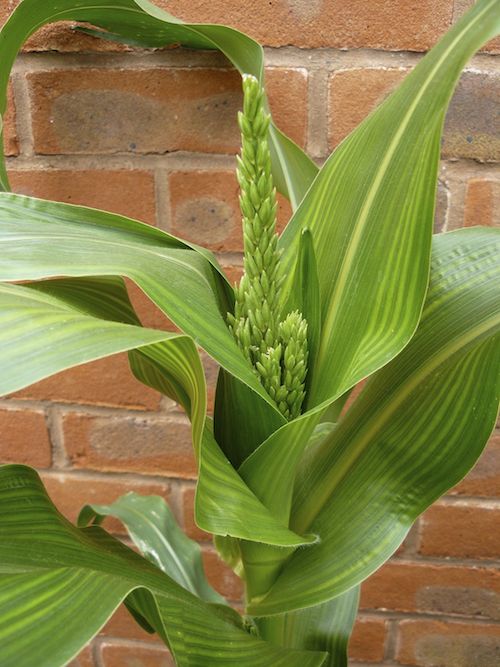
I think the runaway success is the sweetcorn.
Check this shizzle:

It’s big, and leafy.

And look what’s hidden under those leaves:

sweetcorn2


If you got some kind of gardening book, and looked up what sweetcorn should look like while it’s growing, that’s what you’ll find. Perfect.

Security and privacy online

There’s been a bit of talk recently about security and privacy.

A journalist from The Guardian stalked a girl via Foursquare, Facebook is never far from the headlines, and sites like
http://icanstalku.com have brought to light how much information you’re really giving away, while snapping photos and sharing them online.

But what if it’s too late for prevention?
What if you’ve been taking photos and sharing them online for ages, via services like Twitpic and Yfrog. What then, eh?
Presumably you can just select all your photos and delete them, no?

Well, no.
If you try and find a way to delete all your photos from Twitpic for example, you’ll likely come across this handy information.

That’s two options right there.

Neither of which actually deletes anything.

“Both of these methods are undo-able, which means that your account and photos will be restored if you login after deleting your account.”

Everything is just temporarily hidden from view.

So the only option, if you want to delete them is to do it from the main screen. ONE AT A TIME.

After every one, you get a handy popup message to ask if you’re absolutely sure, before the page very slowly refreshes, and you can attempt to delete another. Everything is geared to making sure you don’t just delete all of YOUR OWN photos.

Twitpic isn’t the only option though. Maybe Yfrog is better?
In a word, no.

In fact, Yfrog is odder still.
Bizarrely the frequently asked questions includes NO mention of how to delete your photos.

I call this bizarre, because if you go into the user forums, just look at this page:

The most popular question by a long way, is how to delete photos.

It isn’t immediately obvious how to delete multiple photos either (no way as far as I can find).

Someone asks in the yfrog forums how to remove their account, and the answer given is to open a support ticket.

They’ve made it as complicated as possible, for you to just remove your own photos.

Do you use Tweetdeck?
Unless you’ve changed the default picture uploader, you’ll be using TweetPhoto, when you upload a picture.

How to delete A (singular) photo?


Easy.

Is there a way to bulk delete old photos?

No.

“How do I delete my account?”
Well yeah…about that.
We didn’t really think anyone would want…errr…

Unbefuckinglievable.
Not only can you not just click to “delete my account”, but you’ve got to delete every photo individually.

The one saving grace I’ve found with all of this is that Twitter for iPhone (the client I (and lots of others) use at the moment, formerly known as Tweetie) has the option for custom api endpoints.

No, I didn’t know what they were either.

What this appears to mean, is that with a few plugins to WordPress, I can post photos from Twitter to my own webspace, host them myself, and have full control over them.
It isn’t immediately obvious how, but I found these instructions via Google at random, which seems to explain it.
All a bit more complicated than it should be, in my opinion.

I’m not a fan of Facebook, and we all know there are massive privacy flaws there, but services launched since (such as photo-sharing sites) are clearly no better.
Say what you like about Google, but at least I can go into Picasa and delete one/some/all of my OWN photos if I want to.

Update: I contacted Twitpic to check if I was missing an option, and see if there is any option for bulk deletions. I got this reply from them:

Still no change from my earlier opinion then.

The flower bed

For those of you who haven’t seen any of my “building a pond” video series, you won’t be aware of how frustrating my garden is.
It’s nice to live in the city, and it’s nice to have a garden while living in the city.
It’s also nice to have a friendly landlady, who will let you dig up her garden and plant things.
What isn’t so nice, is that when you start digging, you find a couple of inches of soil, then bricks, rubble, old bits of guttering, and any other crap the people who built the house couldn’t be bothered to take away with them.
There’s a tarmac road off one side of my garden. But if you dig pretty much anywhere in the garden, you’ll hit tarmac pretty quickly.

Today I started looking at a patch we’re not utilising. The patch between the pond and the back fence. Here it is:

That pond was hard work. Even with wet soil, it required a pick-axe to get through the rubble. The flowerbed on the left is actually only there because I couldn’t dig deep enough at the edge to put the pond there, due to a seam of solid immovable rock I hit.

A few weeks back, I rather stupidly suggested we dig the area between pond and back fence.
I had a go at this today, and the combination of poor soil, and severe lack of rain lately, has left it absolutely rock hard.

So, thought I – why not just build a raised bed?
I found a thing on Sainsburys’ website, which looks pretty good.
That’d almost exactly fill that space, but leave enough room to get to the compost bin. Perfect.

I’m impatient though, so I drove to Sainsburys, only to find they don’t stock them in store.
Then I went to B&Q, but they don’t have anything remotely like it.
I looked at some plant pots, but that just confirmed my fears that plant pots are either:
a) Expensive
b) Too small
c) Cheap-plastic-looking
d) All of the above.

So in B&Q, I picked up one of these liner sheets, for carrying things without getting your car boot dirty.

That was £1.

Next, I got some compost. Two of these 70 litre ones.

P1020113


They were £3.98 each. Seems good value – I don’t buy compost often enough to know though.

Then I laid the boot liner out in the garden:

Problem is, it was really windy.

I guess with potato planters, and the Sainsburys product, that there is some sort of structure to keep it standing up straight.
I mean just look at it:

That maybe needs a little help to stay in position.

Luckily, I have some old bricks not doing anything, that I discovered while building a pond.

P1020112

Much better.

Now I filled it with compost.
(Ok, it was two types of compost. I had half a bag of a different sort left over.)

At this point I realised a couple of things.
1. It still isn’t that sturdy
2. Boot liners don’t have holes in them. They’re designed to keep plants, compost, muddy shoes away from your expensive car’s carpet on the other side.

To solve both of these issues, I cut a bamboo cane into bits, and after using one piece to make holes in the bottom of the plastic, I hammered them through the liner and into the ground at various points.

Ta-da:

Ok, so it’s a bit like a sandpit that’s gone very wrong.

Maybe it needs a few pots around it to hide the plastic nature of it.
And it’ll look better once it has some flowers growing in it. Maybe.

Update: 15th July.
Check me out.
After only 5 days, I’ve got shoots popping up out the flower bed. Not bad, considering I didn’t follow any of the instructions at all regarding propagating on window sills or anything. I literally just threw the seeds in, and watered them.

P1020117

It functions.
And my girlfriend liked it, and said (without me even mentioning it), that it’ll help kill the rubbish grass underneath it (when we dig it out properly at a later date).

Update: 31st July.
Nearly 3 weeks since I did this, so thought I’d do another update.

It seems I have a slight issue, in that my soil has started to turn a bit…green, and the consistency of something you might find in a shady forest.
This could be down to insufficient drainage in the boot liner. There’s not that many holes in it really. I may attempt to make some more.

Plants looking fine though, except the ones on the left which have been nibbled by something.

Frogs!

Yesterday something jumped off my lawn and into the pond, scaring my girlfriend in the process.
And it was a frog.
Or rather, several frogs.

Very odd actually. They’re actually smaller than some of the tadpoles, and a different colour.
I wondered for a while whether they might be frogs that have jumped from another pond, but there isn’t another nearby (as far as I know) so they must be mine.
I got the camera out tonight to try filming them, but they’re so small (smaller than a 5p piece), they’ve really hard to focus on. Plus my camera won’t refocus while it’s recording, so if they move (they jump, and swim…. very fast) then that’s me scuppered.

Here’s a quick video I managed to make anyway.

Leaving the petrol station

I’ve become known in some tiny circles as “that guy who tweets, while working in a petrol station”, it seems.
Before I finished my last shift at 7am Monday morning, thought I’d do a bit of filming. There’s no manager salaries, and no inside secrets – just a couple of minutes of random behind-the-scenes crap from my job.

Frankly this will be of no interest to 99 out of every 100 people.

No, the iPhone 3G doesn’t do very good video.